Every feature, in action
See the whole household OS at work
This is the actual, shipped tour — not a wishlist: Today's daily agenda, every List your family keeps, and Food — the flagship, checked against your household's allergies. The best way to see it is to use it: the app is free, no card needed.
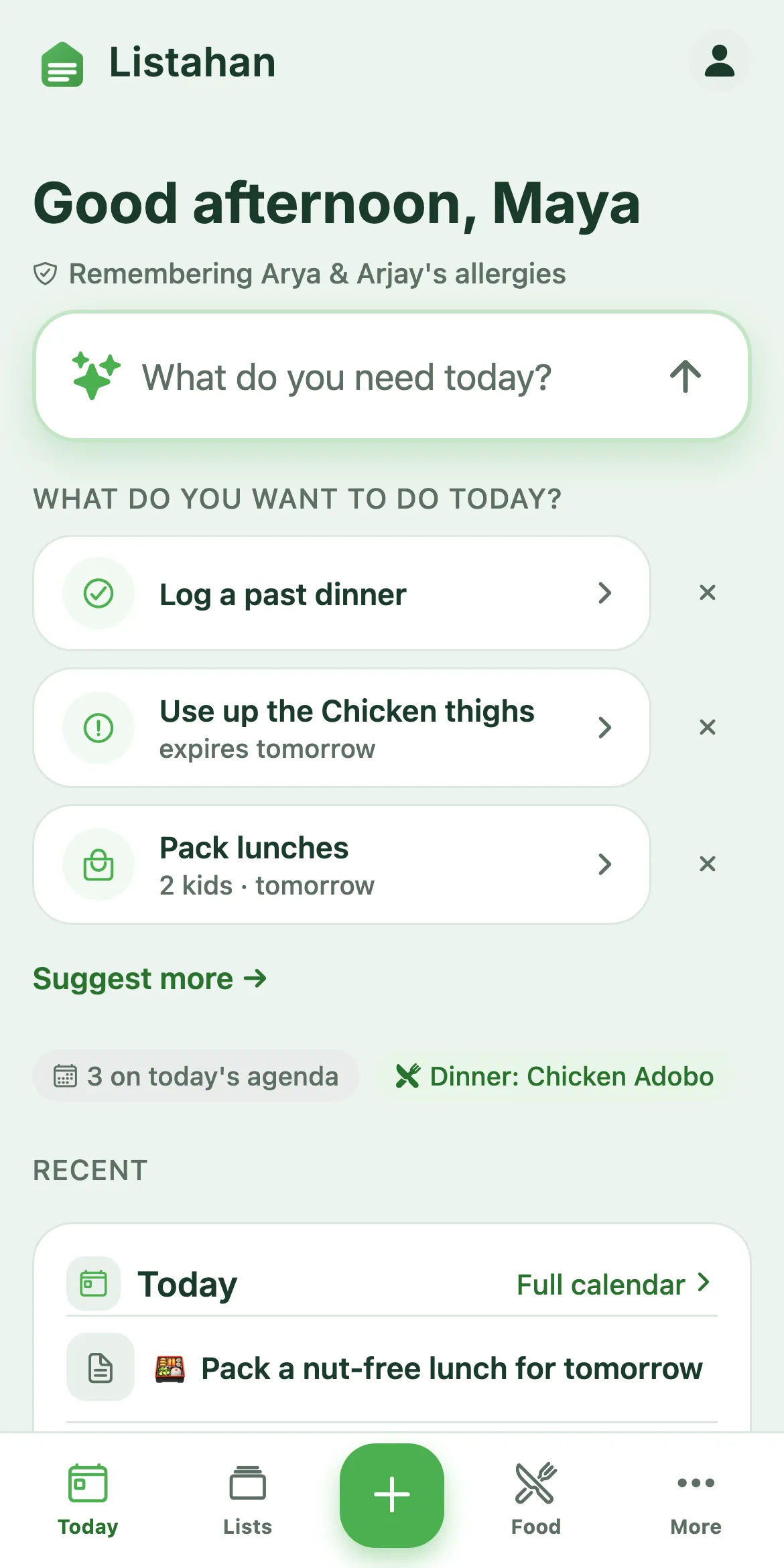
Today
3 on the agenda
Packed
3 lunchboxes
The daily cockpit
Today
What needs you right now, pulled from everywhere else in the app — plus the guided flows that build your plan for you.
Today
One screen for what your household needs right now
Open the app and Today already knows what matters — tonight's dinner, the grocery run, a reminder that's due, what's expiring, even a pet task that's overdue. It's pulled from every part of Listahan automatically, so "what does my household need today?" has one answer, not five screens to check.
- Pulled from Food, Lists, Reminders & Pets — automatically
- Shows what's due, not everything you own
- The first thing you see when you open the app
Today · Tuesday
Dinner: Chicken Adobo
No banned allergens found
Grocery run
6 items on the list
Feed Rex
Due this morning · Sam
Permission slip due
Reminder set for 4pm
Do-it-with-me flows
Tell it what you need. Listahan builds it.
There are 14 of these guided flows now, and dinner is just where they started. Tap "What's for dinner tonight" for one safe pick built around what's already in your kitchen. Tap "Plan the week" and wake up to seven dinners on the calendar. Tap "Pack lunches" and every lunchbox is built to each kid's school rules — checked against your household's allergies before it ever reaches you. And it goes well past food: a Sunday reset, a school-morning rundown, a chore sprint, clearing the list, a budget check, using up what's about to expire, restocking what's low, getting ready for an event, adding a household member, a pet day, or starting a checklist from scratch.
- 14 flows, one tap each — from dinner tonight to a chore sprint to the Sunday reset
- Food flows are checked against your allergies first
- Free and deterministic — no model calls, no extra sign-up
What do you want to do today?
What's for dinner tonight?
One safe pick, built for you
Plan the week
Seven dinners, sorted in one tap
Pack lunches
Each kid's school rules, applied
Weeks · trips · events · checklists
Lists
Every list your family keeps — one place, not six.
Lists · one place for everything
Every list your family keeps — organized without you trying
Open Lists and what needs you next is already at the top — then your own lists, then curated starters for the ones you haven't made yet. Give any note a date and it quietly becomes an event with a reminder; add checkboxes to anything.
- Coming up · Your lists · Explore starters
- Curated starter templates — never a blank page
- A date turns any note into an event, automatically
Coming up
Lola’s birthday dinner
Sat · menu + shopping + schedule
Camping at Bear Lake
in 3 weeks · packing 12 of 18
Your lists
Costco run
checklist · 9 items
Gift ideas
note · shared with Sam
Reminders & the family journal
Reminders that actually ring, and a place the little things live
Put a date on anything — the permission slip, the propane refill, the sitter's arrival — and your phone speaks up when it's due. Everything with a date lands on the household Calendar, meals and events side by side. And the moments that aren't chores go in a shared family journal that hands you "this day last year" when it comes back around.
- Reminders that ring, not silent nudges
- One household Calendar — meals and events together
- A shared family journal, built in
Reminder
Propane refill
Ringing now · before the camping trip
Family journal
The household Calendar
One calendar for meals, events, chores and reminders — together
Every date across Listahan — a dinner on the plan, a birthday, a chore due today, a reminder set for 4pm — lands on one household Calendar, not four different screens. Zoom out to the month, in to the week or the day, and Listahan flags it when two things land at the same time. Export it to your phone's own calendar app (ICS) whenever you want a copy outside Listahan — and when you're just getting started, Switch-In pulls in the events and reminders already on your phone so you're not starting from zero.
- Meals, events, chores & reminders — one calendar, not four
- Month, week or day — and it flags scheduling conflicts
- Export to your phone (ICS) · Switch-In imports what’s already there
This week
WeekTue · Chicken Adobo
Dinner
Wed · Take out the trash
Chore · Sam
Sat · two events at 2pm
Conflict flagged
Lists are free for your whole household — see the full page at /lists/ →
And it keeps working without a signal: your own lists, plans, chores and reminders work offline, and packing checklists are bundled right into the app. Catalog recipe pages need a connection.
Recipes · planning · groceries · cooking
Food — the flagship
The pillar with the most depth — checked against your household's allergies. 2,562 recipes, 49 cuisines.
See how Lens scores every dish →The safety gate
Every meal checked against your family — automatically
Set each person's allergies and dietary rules once. From then on, every recipe, meal plan, swap, and lunchbox is checked against them — the same exact check, every time. It's not a guess, and it runs even on the free plan.
- Per-person allergen profiles
- Runs on every plan, swap & lunchbox
- Flags and removes — never silently drops
Chicken Adobo · ingredients
Your family’s recipes, kept
Keep the recipes your family actually cooks
The link a cousin sent. The photo of a handwritten adobo. Save them alongside the library — private to your household, marked Unverified until you confirm the ingredients, and part of the same safe plan.
- Paste any recipe URL — a blog, a video, a note
- Snap a photo of a handwritten card or cookbook page
- Private to your household — we never fake a safety check on a recipe we haven’t read
Add to your cookbook
Paste a link
Any recipe URL — blog, video, or note
Snap a photo
A handwritten card or cookbook page
Lens meal planning
A week of dinners, planned your way
Build the week meal by meal — Listahan suggests a safe pick for each slot around your kitchen, your preferences, and everyone's allergies. Choose what you like, swap what you don't. Every meal is safety-checked the moment it lands on the plan.
- You decide every meal
- Suggestions from what you already have
- Draws from 2,562 recipes, 49 cuisines
This week’s plan
Mon
Chicken Adobo
Tue
Beef Bulgogi
Wed
+ Add meal
Thu
Dal Tadka
Fri
Salmon Rice
Sat
+ Add meal
Lunchbox planner
Nut-free, allergy-aware lunchboxes, sorted
Each child can carry school-specific rules — a nut-free classroom, no shellfish — that stack on top of their own allergies. The lunchbox planner excludes recipes with detected conflicts and flags anything it can't verify for that child, at that school.
- Per-child, per-school rules
- Stacks on personal allergies
- Pack the whole roster at once
Lily · Grade 2
Nut-free classroom · no shellfish
Presyo price index
Know what it costs before you shop
Listahan turns your weekly plan into a shopping list automatically — and shows real, community-sourced neighborhood prices so you can estimate the trip before you go. Prices are anonymized; the savings are yours.
- Auto-built from your plan
- Real neighborhood prices
- Anonymized — never traceable to you
Shopping list · this week
Prices from real receipts near you · anonymized
Cook mode Pro
Hands-free cooking, step by step
When it's time to cook, Listahan reads the steps aloud — free on every plan — so you can keep your hands on the knife and your phone out of the sauce. Snap a receipt when you're done to stock your kitchen automatically.
- Steps read aloud — free, every plan
- Big, glanceable steps and timers
- Receipt scanning to restock the pantry — Pro
Chicken Adobo
Step 2 of 6Heat oil over medium-high heat. Add garlic and sauté for 30 seconds until fragrant.
Reading aloud…
Step 2 of 6 · spoken as you cook
Ingredient substitutions
Out of something mid-recipe? Instant swaps, allergy-checked.
Tap any ingredient while you're cooking and Listahan suggests proven swaps for it — free, on every plan. Any option that would introduce a household allergen is removed automatically before you ever see it — that's a safety behavior, not a paid one. With Pro, those same swaps are also ranked by what's already in your pantry, so you don't need to shop.
- Safe swaps for any ingredient — free, every plan
- Allergen-unsafe swaps removed automatically — always on
- Ranked by what's already in your pantry — Pro
Out of buttermilk?
1 cup milk + 1 tbsp lemon juice
In pantry · ProStir and rest 5–10 min until slightly curdled.
1 cup coconut cream + 1 tbsp vinegar
Removed — contains tree nut (coconut)
Go deeper on Food
Follow the whole weekly loop
Plan, shop, and cook — each part of the Food pillar has a page of its own.
Meal planning
A safe week, planned for you
Explore →Grocery lists
A list that builds itself
Explore →Kitchen & pantry
Snap a receipt to restock
Explore →How it works
See the whole loop
Explore →That's the Food pillar, start to finish. Up next: the non-food side of the household — Chores, Tasks & Pets ↓
Beyond food
Household
The non-food side of running a home — Chores, Tasks & Responsibilities, and Pets are live today, with more on the way.
Household · Chores
Chores that repeat on their own, assigned to whoever's turn it is
Set a chore's cadence once — daily, weekly, every three months — and it comes back on schedule without you re-adding it. Tap to assign it to anyone in the household, and tap to mark it done. It's on the free plan, on your household's shared device, from day one.
- Recurring chores — daily, weekly, every 2 weeks, monthly, or every 3/6 months
- Tap to assign to anyone in the household
- Free from day one, no sign-up required
Chores
Unload dishwasher · Sam
Done for today
Household · Tasks & Responsibilities
What's mine, what's ours — in one place
Chores, reminders and quick to-dos all feed the same task list, so nobody has to check three screens to see what's outstanding. Tap any task to assign it — or hand it off — to whoever's turn it is. The Responsibilities map rolls it all up by person, honestly: anything recurring with no owner shows up under Unowned instead of quietly falling through the cracks. All of that is free and works signed out, from day one. My Tasks — a personal view scoped to just your device — is part of Pro.
- Chores, reminders & to-dos — one task list, not three
- The Responsibilities map — who owns what, with an honest “Unowned” list
- Free and works signed out · My Tasks personal view is Pro
Responsibilities
Household · Pets
The first non-food part of the household, in the same app
Feeding, vet visits, meds and grooming — set the cadence once and each one comes back on schedule, assigned to whoever's turn it is. Flag food or litter as running low and it turns up on your Today screen before you're caught short.
- Recurring care, assigned to a person
- Running-low flagged on Today — a nudge, not an auto-order
- A pet-food catalog and homemade recipes to start from
Rex · Dog
Care & supplies
Coordination & memory — not veterinary advice.
That's every shipped feature, pillar by pillar. See how they fit together — the whole household operating system →
The fastest way to get it is to try it
Get the app — free to start, no card needed. Plan a week and watch Today, Lists and the allergen gate work together.
Cancel anytime — your recipes, kitchen and shopping list stay yours and free, and the allergen safety gate keeps running. Pro features (Household Lens plans, lunchbox scheduling automation, and receipt scanning) simply pause until you come back. Nothing is deleted.